 Sonde
SondeClosed beta
Tuning and scanning
Where the radio points and what gets decoded: the Spectrum screen, parking on a known frequency, sample rate and decode bandwidth, gain, and the multi-sonde auto-scan.
The Spectrum screen
The Spec tab shows a live trace and waterfall of whatever the SDR is capturing. It only runs during a capture: with nothing streaming, the screen reads Idle with the hint Tap Start Chase on the Chase tab to begin capturing. Start a chase first, then come back here.
Three things to know on this screen:
- The tuned readout. The header's right side shows the centre frequency and half the captured span, for example
403.200 MHz ±0.13. The ± number changes with the sample rate: an Airspy at 6 MHz shows ±3.00, an RTL-SDR at 250 kHz shows ±0.13. - The Span row.
Span:chips list the rates the connected device supports; with an Airspy that is3 MHzand6 MHz. The on-screen hint (also pinch the graph) means what it says: a pinch gesture changes the span too. - The Tune row.
Tune:has a coarse slider, anMHztext field, and aGobutton. The slider spans 24 to 1700 MHz in one screen width, so it is for big jumps only. For an exact frequency, use the field andGo.
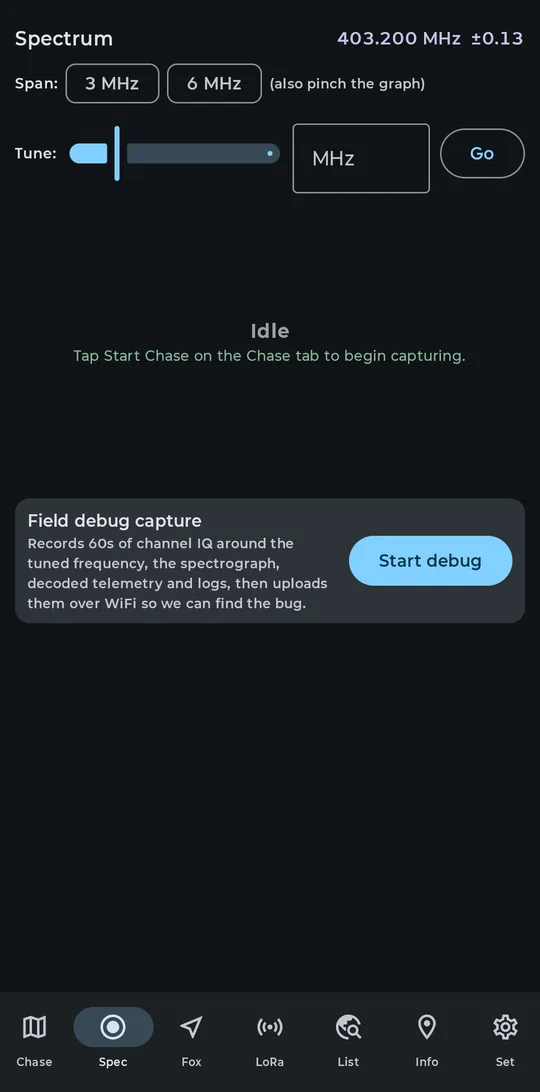
The Spec tab parked on 403.200 MHz
Parking on 403.200 MHz
403.200 MHz is a common sonde channel, and it is the exact frequency beta testers are asked to verify. It also matters for the RTL-SDR spur check below. To park there:
-
Start streaming first
Tuning controls only apply while the SDR is streaming. Open the Chase tab, tap Start Chase, and accept the USB permission prompt. Typing a frequency while idle does nothing and is not saved.
-
Type the frequency
On the Spec tab, type
403.2into theMHzfield next toTune:. -
Press Go
The retune is live: the waterfall does not restart, the frequency axis re-centres, and the band ruler's window marker moves.
-
Confirm the header
The header now reads
403.200 MHz. That readout is the check that matters.
The retune persists: stop and restart the chase and the app comes back on 403.200 MHz. A fresh install defaults to 403.5 MHz, not 403.2, so this step is always needed once. There is no frequency field in Settings; tuning lives on the Spec tab.
Tap-to-tune on the spectrum graph is designed but not wired in the current beta. Tapping a peak leaves the tuning unchanged, whatever the on-screen hint suggests. Use the Tune: field and Go. This is a known gap, not a bug worth reporting.
Sample rate and bandwidth
The sample rate sets how much spectrum the SDR captures around the tuned centre. The two supported radios differ:
| Device | Rates | Notes |
|---|---|---|
| Airspy Mini / R2 | 3 MHz or 6 MHz | 6 MHz is the fresh-install default |
| RTL-SDR | 250 kHz to 3.2 MHz | 3.2 MHz sits at the USB limit and can drop samples; 2.4 MHz is the sensible wide choice |
The service snaps any requested rate to the nearest one the connected device supports, so picking an RTL chip while an Airspy is attached (or the reverse) is harmless. RTL hardware also has a dead zone: requests between 300 and 900 kHz are bumped to 960 kHz.
A fresh install defaults to 6 MHz, the Airspy default. On an RTL-SDR the service clamps that to 3.2 MHz, which is exactly the rate that can drop samples over USB. The clamped value is written back to settings, so reopening the Set tab shows the 3.2M chip selected; only a Settings screen left open across the chase start still shows the old value. On an RTL-SDR, pick 2.4M explicitly.
A sample-rate change does a brief mini-restart of the stream. Frequency, decode bandwidth, gain, and bias tee all apply live with no restart.
Decode bandwidth (SNR)
Capturing and decoding happen at different widths. The SDR captures the full sample-rate span, but decoding runs in a much narrower channel filter centred on the tuned frequency. That filter is Decode bandwidth (SNR), in Set under SDR (Airspy / RTL-SDR).
Narrowing the filter cuts noise and raises SNR. On a weak RS41, switching from the default to 6.3 kHz · RS41 (max SNR) can turn a marginal signal into a decodable one; the C/N readout on Spec names the width it is measuring in, so you can watch the number rise.
A narrow filter does not just prefer one sonde type; it makes wider types undecodable, silently. An M10/M20 needs about 20 kHz of bandwidth, so it will never decode through a 6.3 kHz filter, and the app will not tell you why. 25 kHz · all types (default) covers every supported type. Only narrow the filter when you know what you are chasing, and switch back afterwards.
48 kHz · wide / scan is the wide fallback for scanning. Changes apply live, no restart.
Gain, bias tee, and the HF upconverter
Four profiles under Gain profile in Set:
- Quiet rural (sensitivity): near-maximum gain. Start here at a quiet site.
- Urban / interference: gain backed off to survive strong nearby transmitters. Pick this when the noise floor jumps around or the trace looks compressed.
- External LNA: low internal gain for setups where a masthead amplifier supplies the gain.
- Manual gain: three sliders (LNA, Mixer, VGA) plus AGC toggles, applied live while streaming. Watch the Spectrum tab as you drag.
On the Airspy, the three preset profiles also get a clip-driven overload AGC; Manual disables it, so manual gains are honoured exactly, even if that leaves the front end overloaded. On an RTL-SDR, a non-Manual profile is not fixed either: hardware AGC plus a closed-loop optimizer can step the gain by itself based on measured carrier-to-noise and decode rate. Pick Manual on either radio when you need the gain to stay put. One RTL-specific note: only the LNA slider has a real effect on that chip; the Mixer and VGA sliders do nothing independent there.
Bias tee feeds DC up the antenna port to power a masthead LNA, or the SpyVerter. It is off by default, applies live, and is remembered for the next start.
The toggle carries a red warning in the app for a reason: it puts DC on the antenna connector. Only enable it with a bias-tee-safe antenna or amplifier attached. The app never switches it on for you.
HF upconverter (SpyVerter): with the toggle on and an LO set (120 MHz is the SpyVerter default), tuning to any frequency at or below 60 MHz shifts the hardware tune up by the LO, while every number on screen stays the true frequency. Above 60 MHz the SDR tunes direct even with the toggle on. The SpyVerter is powered from the bias tee: with bias tee off, the app shows an error-coloured warning that the converter stays dark.
Auto-scan (multi-sonde)
Auto-scan finds and decodes several sondes at once from a single SDR capture. It is enabled on a fresh install. Use Set > Auto-scan (multi-sonde) > Scan and decode multiple sondes to turn it off or back on. Its CPU and battery cost grows with the decode limit shown below.
How it finds sondes
About once a second, a scan FFT looks across the whole captured span. A peak survives only if its occupied bandwidth is sonde-plausible, 5 to 30 kHz: a bare unmodulated carrier is rejected outright, and so is wideband junk. Survivors are quantized to a 10 kHz channel raster and ranked by in-band carrier-to-noise, with demotions for off-raster offsets and unstable amplitude.
Each scan FFT sees the current SDR span. An Airspy at 6 MHz centred on the default 403.5 MHz covers 400.5 to 406.5 MHz, nearly the whole met band. When a narrower span cannot cover 400–406 MHz and the tuner is already near that band, SondeFox dwells for 15 seconds and retunes through overlapping windows while nothing is locked or being probed. It parks when a tracker locks, and a recent manual tune gets a 30-second hold before any hop.
Probing, locking, and the budget
While nothing is locked, the scheduler spends 1 to 2 cheap probes, dropping to 1 after 6 fruitless attempts. A probe that produces a CRC-valid frame within its 5-second dwell becomes a tracker and keeps its decode chain. Each lock raises the budget: with a number of sondes locked, the scheduler runs 2 plus that number of probes, always capped by your decode limit. A tracker survives until 60 seconds pass with no valid frame; a probed frequency that produced nothing is blocked from re-probing for 3 minutes.
The decode limit and its CPU cost
Max simultaneous decodes offers 1, 2, 4, or 6 chains; the default is 4 and the hard cap is 6. Each chip is priced in measured percent of one CPU core at the current sample rate: roughly 4 percent per chain at 250 kHz, rising to about 13 percent at 6 MSPS, so 4 chains at 6 MSPS is about 53 percent of a core and 6 chains about 79 percent. Change the sample rate and the prices recompute. The estimates come from one reference phone; other chips land elsewhere, but the ratios hold.
The Decode bandwidth (SNR) filter is inherited by every chain the scanner creates, and it still runs before type detection. With a narrow RS41 filter set, the scanner will probe wide types, fail to decode them, and blocklist their frequencies for 3 minutes. Keep 25 kHz · all types (default) or 48 kHz · wide / scan while scanning.
What you see
On the Spec tab, solid marker lines ride the waterfall and trace for locked sondes and dashed lines for probes, with a legend (locked, probing, queued, ignored) and a live CPU estimate line underneath. On the List tab, every locked sonde gets its own card: type and serial, frequency, altitude, SNR, climb arrow, and how long ago it was heard, all updating at the same time. A fresh lock can appear under a provisional serial until the real one decodes, at which point the card is renamed.
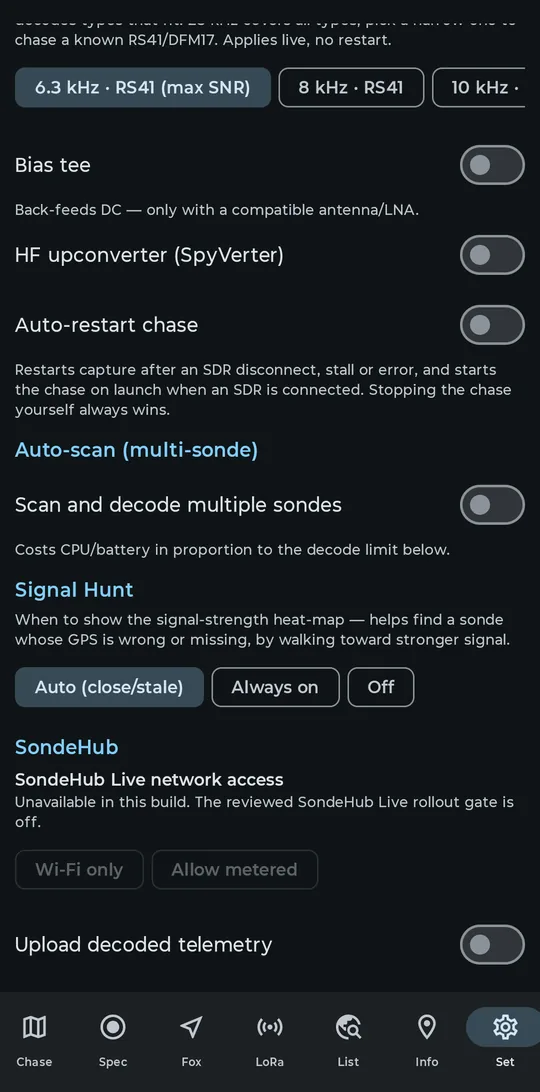
Set > Auto-scan (multi-sonde), with the decode-limit chips priced in CPU
RTL-SDR reference spur cancellation
New in 0.9.24
Every RTL2832U dongle runs from a 28.8 MHz reference clock, and harmonics of that clock leak into the received spectrum. The 14th harmonic lands at exactly 403.200 MHz: a real sonde channel, and the frequency this page just told you to park on.
On the spectrograph, a reference spur is easy to recognise: a thin, perfectly steady vertical line on the waterfall, with a matching persistent narrow peak on the trace, at an exact multiple of 28.8 MHz. It stays there with the antenna unplugged, because the dongle generates it itself.
Since 0.9.24, the RTL path cancels these coherent spurs in the IQ stream immediately after sample conversion, before the demodulator, the spectrum display, AGC, and the decoders. There is no settings toggle and no badge: it is always on for RTL-SDR, and never runs for the Airspy, which has no such spur and needs no canceller.
The cancellation model is rebuilt after every retune and after every sample-rate change. While it reacquires, about 65 blocks pass through unmodified, roughly 0.2 seconds at 2.4 MS/s, so the spur line may blink back briefly right after a retune and then vanish again. If no 28.8 MHz multiple falls inside the captured span, nothing is cancelled at all: at 250 kHz centred on 403.5 MHz, the 403.200 harmonic is out of band, so use 2.4M or wider to see the effect. Levels on the Spec tab are dBFS, not dBm.