 Sonde
SondeClosed beta
The whole chase loop, one app
Scan the 400–406 MHz radiosonde band, decode frames on the phone, follow the balloon on a live map, and walk the last kilometre with a heat-map, with an Airspy or RTL-SDR plugged straight into your Android device. No root or separate driver app. Here is what the beta does today, and what is still gated or on the roadmap.
An SDR pipeline that lives on your phone
SondeFox owns Android USB discovery and permission. Its Airspy path streams through Android USB directly; for RTL-SDR, the app passes Android's already-authorized file descriptor to the reviewed, vendored sdr-fox Kotlin/JNI companion driver. Plug in via OTG and grant the prompt—there is no root or separate driver install.
Direct SDR over USB-OTG
Airspy Mini/R2 or an RTL2832U dongle (R820T/R820T2/R828D tuners, including RTL-SDR Blog V3/V4) on an OTG-capable Android device. Discovery is automatic; with both radios plugged in, the Airspy is chosen. A powered OTG hub helps with the Airspy's current draw.
Sample rates per radio
Airspy runs at 3 or 6 MSPS. RTL-SDR runs from 250 kHz up to 3.2 MHz; 3.2 MHz sits at the USB limit and can drop samples, so 2.4 MHz is the sensible wide setting. The Span chips on the Spec tab list only the connected radio's real rates.
RTL reference spurs, cancelled
Every RTL2832U generates spurs at multiples of its 28.8 MHz reference clock, and the 14th multiple is 403.200 MHz: a real sonde channel. Since 0.9.24 the RTL path cancels these coherent spurs in the IQ stream before the demodulator, spectrum, and decoders see it. Always on for RTL, never needed on Airspy. After a retune the spur can blink back for about 0.2 s while the canceller reacquires.
Decode bandwidth (SNR)
One setting narrows the IF filter around the tuned frequency. Narrower means higher SNR, but the filter runs before sonde-type detection, so it only decodes types that fit inside it: the 6.3 kHz RS41 preset will never decode an M10. The 25 kHz default covers all types. Changes apply live, no restart.
Gain presets for real sites
Quiet rural, Urban / interference, External LNA, and a full Manual mode with live sliders. Pick one in Settings before you head out instead of fiddling at the launch site. On RTL, the non-manual profiles let a closed-loop optimizer adjust gain by itself; Manual disables all automatic gain control.
Serious RS41 decode
Serial, GPS position, and PTU using each sonde's own factory calibration, protected by Reed-Solomon RS(255,231) error correction. Relative humidity uses the transmitted 51-subframe calibration and was validated against real flights and official sounding archives.
Bias-tee power for an external LNA sits behind a warning toggle and ships off. Only enable it if your antenna or preamp is designed for DC on the coax. The SpyVerter HF upconverter is powered from it; the app warns you about that but never enables it for you.
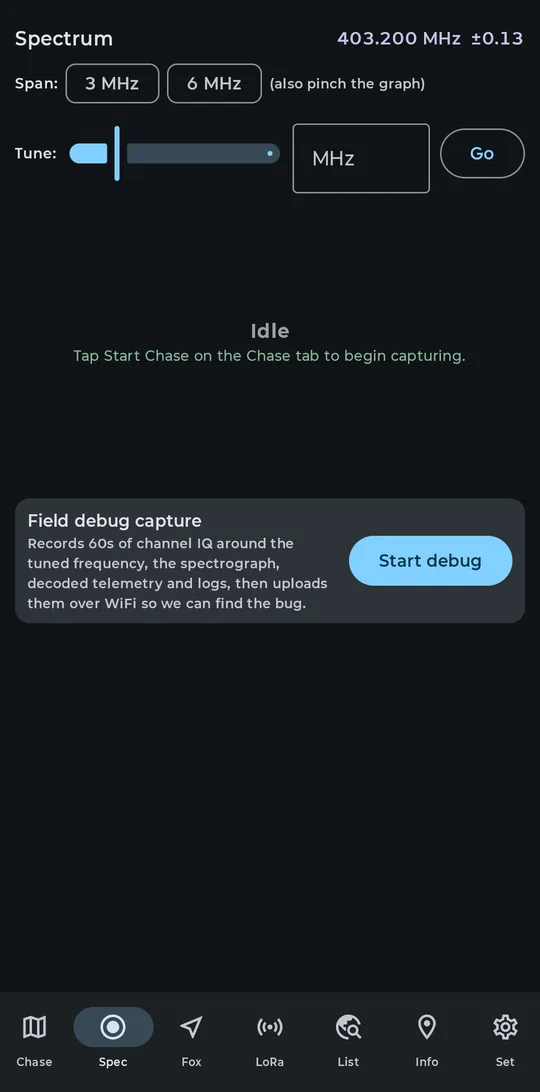
The Spec tab tuned to 403.200 MHz, span and tune controls above the waterfall.
Several sondes from one capture
On by default on a fresh install. SondeFox finds sonde-shaped signals across the captured span and decodes them at the same time; turn off Scan and decode multiple sondes in Settings if you prefer single-channel operation or lower CPU and battery use.
What it does
A scan pass runs about once a second across whatever the SDR captures. Peaks that look like a sonde (5 to 30 kHz occupied bandwidth on a 10 kHz channel raster; bare carriers are rejected) get probed, and any frequency that produces CRC-valid frames keeps its own decoder. Every locked sonde shows as its own card on the List tab, all updating simultaneously.
The limit, and the cost
You cap simultaneous decodes at 1, 2, 4 or 6 (default 4, hard cap 6). Each chain is an independent decoder inside the same capture, and the cost is CPU and battery in proportion to the limit. The Settings chips price each option in measured percent of one CPU core at the current sample rate: roughly 13% per chain at 6 MSPS, so six chains is about 79% of a core. Settings keeps that cost visible so you can lower the four-chain default or turn scanning off.
Span and sweep limits
Each scan pass sees the current SDR span. When that span cannot cover 400–406 MHz and the tuner is already near the sonde band, SondeFox can dwell for 15 seconds and retune through overlapping windows while nothing is locked or being probed; it parks as soon as a signal locks and respects a recent manual tune. An Airspy at 6 MSPS covers the whole band without hopping. The decode-bandwidth filter still applies to every chain, so keep it at 25 or 48 kHz while scanning or wide types will never lock.
Fresh-install behavior
Auto-scan starts enabled with a four-chain limit. The Set tab shows live scanner state, candidate counts, the current limit, and a CPU estimate for every limit choice; the toggle remains available when battery life matters more than discovery.
From highway to hedgerow
The map for the drive, the compass for the walk, the heat-map and Fox Hunt for the last few hundred metres. And a demo mode so you can learn all of it before you own a radio.
Live chase map
A real MapLibre map: the sonde in amber, you in purple, the predicted landing in green. A breadcrumb trail fades with age, dots can be tinted by signal, and a large altitude readout with a climb arrow sits bottom left.
Find-My-style compass
A pointer that rotates toward the sonde once the phone has a GPS fix, with live distance and true bearing. The heading source is switchable in Settings: phone compass, GPS course, or auto.
Signal Hunt heat-map
Receiver-position signal samples rendered as a heat-map for on-foot triangulation. Auto mode engages when you are close or the sonde's GPS fix goes stale; Always on and Off are one setting away.
Fox Hunt
The Fox tab works with either antenna style: an omni gives a hotter/colder signal trend, a directional antenna gives compass bearings you can mark from a few spots for a triangulated fix. It monitors a frequency inside the current capture; retuning still happens on the Spec tab.
Landing prediction
Off by default. When enabled, SondeFox polls SondeHub's predictor every 30 s, 1 min or 5 min and draws a dashed descent path with a landing pin. A separate local ETA line always shows; it assumes a flat 5 m/s descent, so treat it as a countdown, not a landing spot.
Demo Mode (fake sonde)
Set > Demo Mode generates a fake descending sonde near your location with no SDR attached, so you can exercise the map, compass, and chase UI before buying hardware. While it is active, the Chase screen shows an amber DEMO DATA — not live badge so synthetic telemetry cannot be mistaken for RF. Demo telemetry is never saved or uploaded. Details on the testing page.
2D that works offline, 3D when you are online
The MapLibre 2D map is the default, works offline, and is always available. The 3D map is a beta, looks remarkable, and needs a connection. The app never pretends otherwise.
3D map beta Beta
In v0.14.0 the Chase map switches from MapLibre to the native Google Maps 3D SDK for Android. Enable Use Google Maps photorealistic 3D under Set > 3D map beta, accept the new Google Maps disclosure, then choose Open 3D beta in the Chase map controls. The native view requires Maps 3D to be configured in the installed build, current Google Play services, an active connection allowed by the remembered network choice, and the Chase screen in the foreground.
Five camera modes remain: Follow Sonde, Chase Car, Landing Zone, Full Flight, and Free. The compact camera menu enables a data-dependent mode only when its target exists. Native gestures adjust the view; panning focus away enters Free, while an adjustment that stays centred on the followed target can retain that follow mode.
It is online only. SondeFox provides no offline store for Google content. If the network, Play services module, release configuration, consent, or foreground state becomes ineligible, the app tears down the 3D view and returns to MapLibre with a bounded notice. Return to 2D always works because the 2D map remains in the build.
The 2D map's separate Altitude view tilts the flat map and draws reported altitude at a compressed 1:50 scale. It is a height cue, not terrain, and the app says so on screen.
Native and fail-closed
The SDK and rendering module arrive through Google Play services, so a first open can take longer while the module becomes available. The SDK owns rendering quality, content transport, and any internal caching; v0.14.0 does not expose the removed Balanced or Low Power quality controls.
A recoverable SDK failure gets one bounded recreation before 2D fallback. If the process was interrupted while native 3D was starting, the next launch stays on 2D and offers an explicit Retry 3D instead of automatically repeating the start.
Offline 2D maps
The 2D map automatically caches every OpenFreeMap tile you browse, so areas you have merely looked at keep rendering offline. For a planned chase, prefetch deliberately: pick a 5, 10, 20 or 50 km radius in Settings and the app shows a tile and megabyte estimate before downloading (for example, about 178 tiles and 5.8 MB for a 10 km radius).
Each prefetch is budgeted at 6,000 tiles or 250 MB and rate-limited to stay polite to OpenFreeMap's donation-funded servers. Settings shows a live Cached maps size readout and a Clear cached maps button. One caution: Prefetch now runs on whatever network is active, mobile data included, and a 50 km prefetch can reach roughly 150 MB.
Map tiles by OpenFreeMap, © OpenMapTiles, data from OpenStreetMap. That attribution stays visible in the app, as do the Google credits in 3D. It is a condition of using the data, not a design choice.
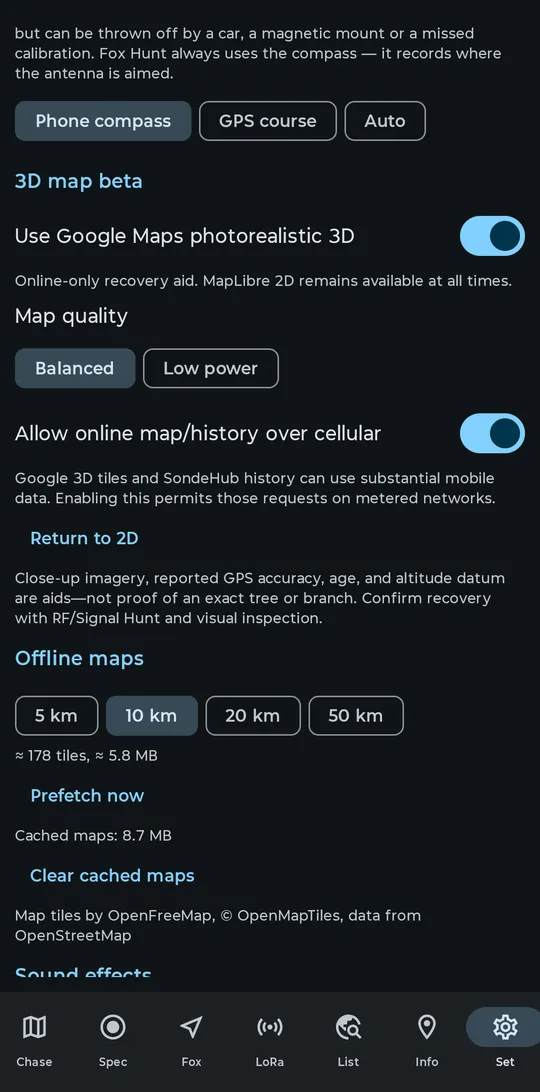
Offline maps settings: estimate first, then prefetch, with a live cache readout.
Follow a flight with no radio attached
Saved Flights works with no SDR plugged in. It is the way to pull a specific flight from SondeHub and keep it, replay it, and chase it.
Type an exact serial (professional sondes) or payload callsign (amateur), pick the Professional or Amateur source, and tap Save & Update. The recent history downloads from SondeHub; Backfill full history fetches the older archive for the same flight. Exact match only; there is no fuzzy search.
A flight still in the air carries a LIVE state. Auto-update is off until you enable it; while enabled, Android may make network-constrained refresh requests about every 15 minutes. Sessions play back on the Chase map at 1×, 5×, 20× or 60×, in 2D or in the 3D beta, with the landing prediction that existed at each playback instant. Every sonde you decode locally with a real SDR is also recorded durably, so your own chases are replayable the same way.
Storage is capped by a budget you choose (100 to 1000 MiB, default 250). Pinned flights survive eviction. Saved telemetry and exact SondeHub imports remain available offline. SondeFox provides no offline store for Google content.
Remote updates default to Wi-Fi only; using cellular sits behind its own consent. Reach the screen from the List tab or the Chase screen's map controls.
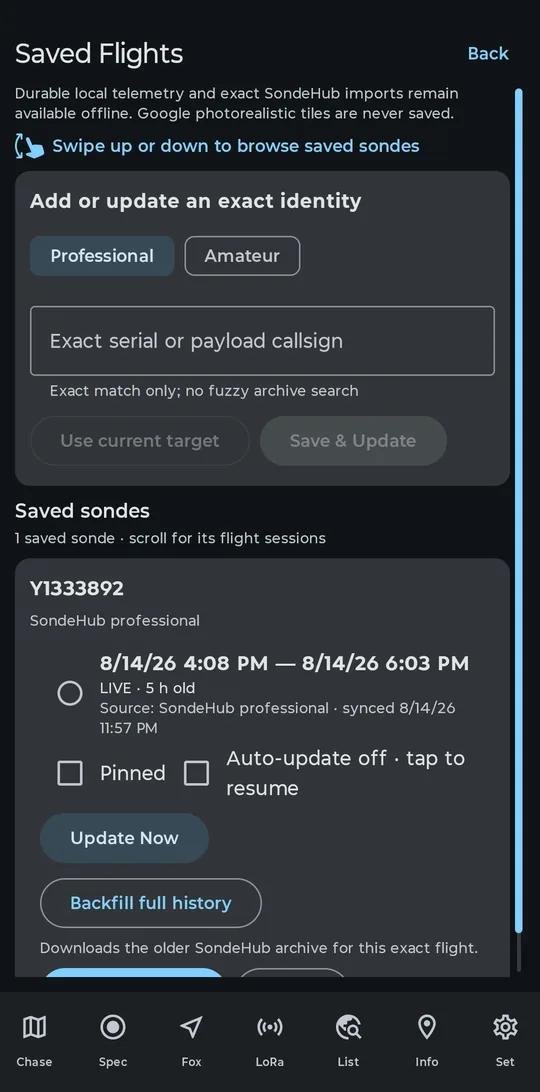
Saved Flights with a live synced flight from SondeHub.
Read what you need, upload only by choice
SondeFox talks to SondeHub in specific, bounded ways, and every upload path is opt-in.
Flight history on demand
Saved Flights imports an exact flight by serial or payload callsign, backfills its archive, and can keep it auto-updating after you enable Auto-update. SondeHub Live is a separate, non-restored foreground preview for balloons in the viewed 2D map area, but it is currently available only in the separately installed SondeFox Test debug build; see the note below.
Predictions and recovery reports
Landing predictions come from the SondeHub predict API after you enable the setting and run a local chase with an eligible radiosonde target. When you find the sonde, a manually confirmed dialog files your recovery report.
Telemetry upload, if you want
Upload is off by default and requires explicit opt-in plus a callsign. From v0.14.14, genuine radiosonde types with an exact SondeHub mapping are eligible only after CRC, confirmed strict identity, GPS time/position, freshness, and plausibility gates; SondeHub's server-side denylist decides protocol acceptance. Decoder validation badges remain independent evidence labels.
Chase-car mode, off by default
Station position and chase-car position uploads are separate toggles from telemetry upload, and both ship off. They are the only way your station appears as a marker on the public SondeHub map. Note that telemetry upload is a separate path: once you opt in and a GPS fix exists, each record also carries your receiver's own position as uploader_position. Details in the privacy notes.
The structural client guard still keeps RS92's approximate RS41 mapping, Meisei's missing mapping, and generic LMS6's unresolved 400/1680 MHz variant out of telemetry uploads. APRS, WSPR, Meshtastic/LoRa, C50, and Unknown remain local-only, and unimplemented roadmap decoders emit nothing.
SondeHub Live is available in current private builds as an explicitly activated, foreground-only network source. It can request active sondes, recent observations and recovery reports around the viewed map area and subscribe to selected flights. The selected network policy applies; reading does not enable telemetry uploads. Older builds differ. See the current privacy disclosure for the request, viewport and location details.
Receiving 400–406 MHz radiosonde telemetry is legal in most jurisdictions, but check your local rules before uploading or chasing, and never trespass to recover a sonde. More on the legal page.
Other signals the same radio can hear
Three extra decoders ride along. All of them decode on the device only; none of them uploads anything to SondeHub. APRS, WSPR, and Meshtastic/LoRa are outside the genuine-radiosonde upload path; C50 and Unknown stay local too.
APRS Shipping
An AFSK 1200 APRS decoder, toggled in Settings. Decoded packets appear alongside your sonde targets and stay on the device; APRS is never uploaded to SondeHub.
WSPR Shipping
A WSPR decoder aimed at balloon beacons, toggled in Settings. Local decode only, nothing uploaded.
LoRa PHY monitor Experimental
Off by default under Set > Experimental. The LoRa tab does blind spreading-factor detection (SF7 to SF12) across multiple channels from a single capture, with APRS presets. The monitor includes Meshtastic decoding with its public default key or a key you supply; it does not extract keys. Use only signals you are authorized to receive. Details in the chirp monitor docs.
Built for hours in a moving car
Foreground service
Capture and decode run in a foreground service, so a long descent does not end because your phone went to sleep in the cup holder. Background the app and the decoded-frame counter keeps climbing.
Auto-restart chase
Off by default. When on, a 15 s watchdog reopens the SDR after an unplug, stall, or stream error, backing off 2/4/8/16/30 s between attempts. An explicit Stop always wins: nothing resurrects a chase you ended.
Clean USB fault handling
Yank the OTG cable and the pipeline shuts down cleanly instead of crashing; your sonde marker, trail, and readouts stay on the map. The RTL path can re-open a wedged dongle once, replaying rate, frequency, gain, and bias tee, before asking for a physical re-plug.
Reviewed radio and decoder boundaries
The Android app owns USB lifecycle, scanning, radiosonde decoding, mapping, storage, and consent. Airspy input stays in the Android USB path; RTL-SDR input crosses a narrow, reviewed boundary into the separately maintained sdr-fox companion driver. The host replay CLI exercises the same SondeFox decoder core for verification.
Decoder core
The portable C++17 core performs channelization, demodulation, frame recovery, integrity checks, and telemetry extraction for Android and the host replay tests: one implementation to verify and maintain.
Replay CLI
sonde_replay runs recorded or synthetic IQ through the full pipeline on a host machine. It is the tool behind the project's end-to-end decode verification.
RTL-SDR via sdr-fox
Android obtains USB permission, then passes the authorized file descriptor to the pinned Kotlin/JNI driver set. The companion driver opens, configures, and streams the RTL-SDR; SondeFox keeps the scanner, decoder, user interface, history, and network policy on its side of the boundary.
The current release targets Android. The host CLI is a test and diagnostic tool, not a separately supported desktop application.
Curious what the app looks like without installing anything? An interactive HTML mockup of five of the app's screens (Chase, Spectrum, Sondes, Details, Settings) runs in any browser; see the live demo.
What decodes today
SondeFox is in beta, and we keep the evidence tiers straight: two decoders are validated end-to-end, several more decode while field validation continues, and the rest are roadmap. From v0.14.14 those badges document decoder evidence independently of upload eligibility. No blurring.
| Sonde family | Manufacturer | Status | Notes |
|---|---|---|---|
| RS41 | Vaisala | Validated | Full decode: serial, GPS, PTU with the sonde's own factory calibration, RS(255,231) FEC. Humidity validated against real flights and official soundings. |
| DFM17 | Graw | Validated | Decode independently validated against SondeHub multi-station data. |
| DFM06 / DFM09 | Graw | In validation | Decodes locally (Hamming(8,4), differential decode). Field validation remains in progress; that badge is independent of v0.14.14 upload eligibility. |
| M10 / M20 | Meteomodem | In validation | Decodes locally; M10 (~9616 baud) and M20 (9600 baud) disambiguated by type byte. Field validation remains in progress; that badge is independent of v0.14.14 upload eligibility. Needs about 20 kHz, so a narrow decode-bandwidth preset will never decode one. |
| iMet-4 / iMet-1-RS | InterMet | In validation | AFSK decode with CRC-checked frames. Field validation remains in progress; a consensus-latched identity supports the strict v0.14.14 upload gate. |
| iMet-54 | InterMet | Roadmap | Recognized; decoder not yet implemented. |
| LMS6 | Lockheed Martin | Roadmap | Detection surface only; decoder not yet implemented. |
| Meisei | Meisei | Roadmap | Detection surface only; decoder not yet implemented. |
| MRZ | Meteo-Radiy | Roadmap | Detection surface only; decoder not yet implemented. |
| MTS01 | Meteosis | Roadmap | Detection surface only; decoder not yet implemented. |
Per-decoder details, caveats, and validation status live in the decoder documentation. One known gap: the Spectrum screen's tap-to-tune is designed but not wired up, so tapping a peak does not retune the radio in the current beta. Use the Tune field and Go.
Help us validate it in the field
RS41 and DFM17 are validated end-to-end. Now we need chasers on real flights, in real terrain, to harden the in-validation decoders too. That evidence work remains important even though v0.14.14 upload eligibility is determined separately by exact SondeHub mapping and strict per-frame telemetry gates. If you have an Airspy or RTL-SDR and an OTG-capable Android phone, we would love your logs.